
BIR registration sounds scary. It is mostly paperwork, and today most of it happens online.
If you already have a DTI certificate, you are a few forms away from becoming a properly registered online seller. Let’s walk through it together.
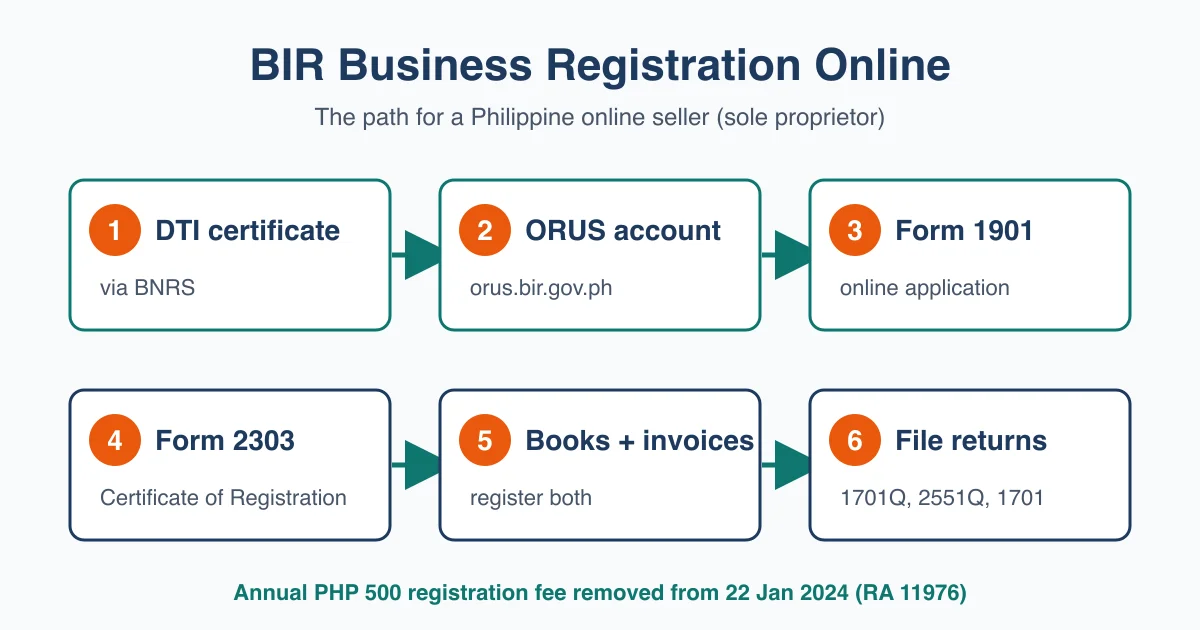
BIR business registration online means applying through the Bureau of Internal Revenue’s Online Registration and Update System (ORUS). You file the Form 1901 application, upload your documents and receive your Certificate of Registration (BIR Form 2303) electronically. This guide is for sole proprietors selling on Shopee, Lazada, TikTok Shop or their own website.
One honest note before we start. We are not accountants, and BIR rules change. We link a source wherever we found one, and we say so plainly where we could not confirm something. Check anything unusual with your Revenue District Office (RDO) or a bookkeeper.
What You’ll Need
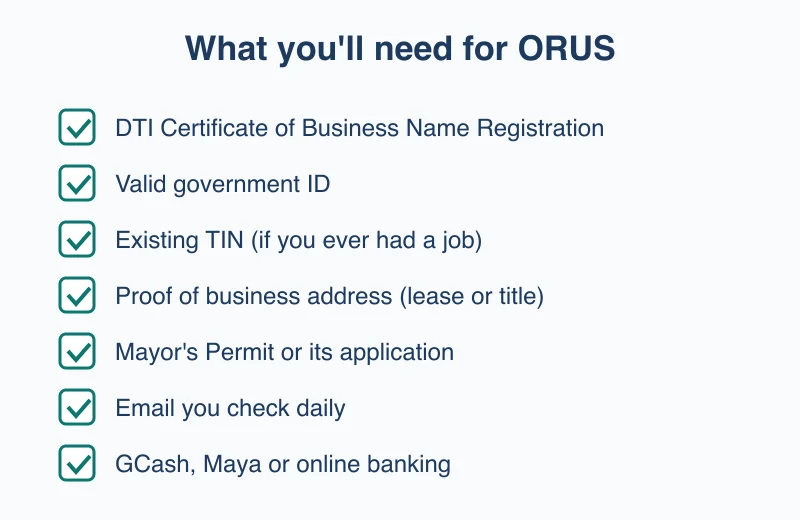
Scan or photograph these before you open ORUS. A clear phone photo saved as PDF or JPG works.
- Your DTI Certificate of Business Name Registration. If you don’t have it yet, follow our DTI online registration guide first.
- A valid government ID showing your name, birth date and address (passport, UMID, driver’s licence or PhilSys ID).
- Your TIN, if you already have one. If you were ever employed, you have a TIN. Never apply for a second one; you will update the existing record instead.
- Proof of business address. A lease contract, or a land title or tax declaration if you own the place. Selling from home counts: your home is your business address.
- Your Mayor’s Permit or its application, if your city requires one for home-based sellers.
- A working email address you check daily. ORUS sends verification links and your Form 2303 there.
- An e-wallet or online banking account for the small certificate fee (GCash, Maya or a bank’s online payment).
Here is how the costs look today compared with before the Ease of Paying Taxes Act:
| Item | Before 22 Jan 2024 | Now | Source |
|---|---|---|---|
| Annual registration fee (Form 0605) | PHP 500 every January | Removed | DZRH, BIR advisory on RA 11976 |
| Certificate of Registration charges | About PHP 30 (a 2023 guide) | Not confirmed: we found no source dated after the change, so ask your RDO | Pinoy Guides, Form 1901 guide (October 2023) |
| Taxpayer size class | Not defined by sales | Micro if gross sales are under PHP 3,000,000 | RR 8-2024, Tax and Accounting Center |
Step 1: Create Your ORUS Account
A word on Steps 1 to 6: ORUS blocked our reader while we wrote this guide, so we could not check its screens ourselves. The steps follow the information the paper Form 1901 asks for. Menu names and the order of screens in ORUS may differ, so follow the wording ORUS shows you.
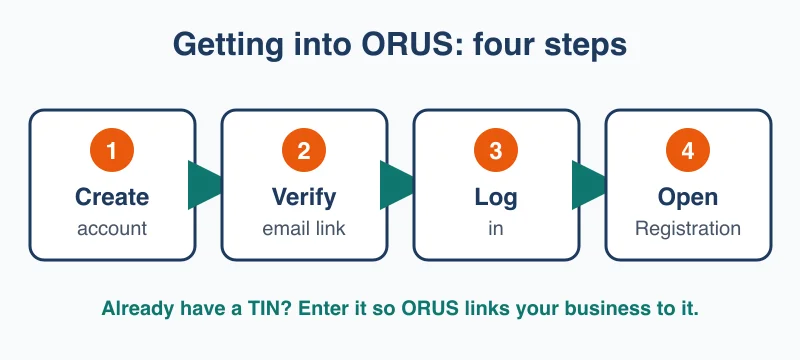
Type orus.bir.gov.ph into your browser and choose the option to create a new account.
- Choose the taxpayer type for an individual.
- Enter your email address, name and birth date exactly as they appear on your ID.
- Open the verification email ORUS sends and click the link.
- Set your password and log in.
If you already have a TIN from a past job, ORUS asks for it here. That links the new business to your existing record, which is what BIR wants.
Step 2: Start a New Business Registration
Once you are logged in, look for the option to register as a self-employed individual or single proprietor. This is the online version of BIR Form 1901.
Pick it even if you still have a day job. BIR calls you a mixed-income earner when you earn a salary and also sell online, and the same Form 1901 covers you (Pinoy Guides).
If you already have a TIN, ORUS may route you to an update instead. That is normal: you are adding a business to an existing taxpayer record.
Step 3: Fill In Your Business Details
This is the longest screen. Copy your DTI certificate word for word.
- Business name: exactly as registered with DTI, including punctuation.
- Line of business: describe what you sell, for example “online retail of clothing”.
- Business address: where you actually work, even if that is your bedroom.
- Start date: the day you began selling, or plan to.
Your business address decides your RDO, the BIR office that will handle your account from now on. You register with the RDO that covers your business address (Pinoy Guides).
Halfway there. Not sure your store is ready for the paperwork stage yet? Take the free StoreStarter readiness scorecard. Twelve quick questions, free, and you’ll see which step to focus on next.
Step 4: Choose Your Tax Type and Income Tax Rate
ORUS will ask how you want to be taxed. For most new sellers, this is the decision that matters most.
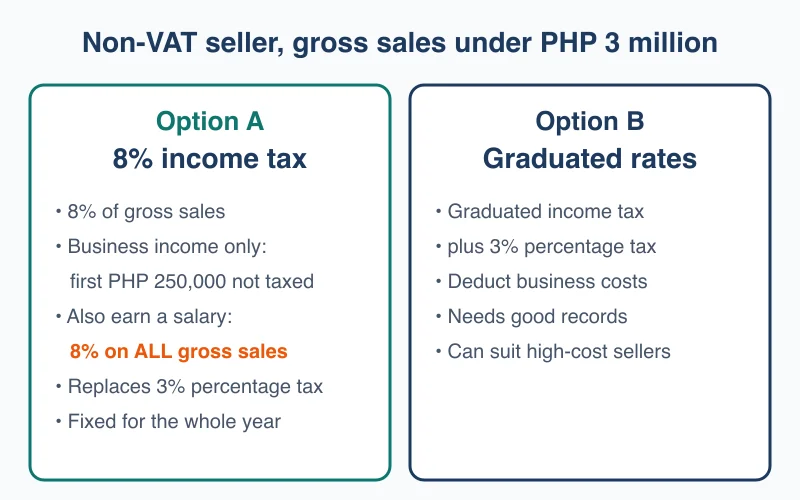
If your gross sales will stay under PHP 3,000,000 a year, you are a non-VAT taxpayer. You then choose between two options:
- 8% income tax on gross sales, which replaces both the graduated income tax and the 3% percentage tax. Simple, and popular with small sellers.
- Graduated income tax rates plus 3% percentage tax, which can work out cheaper if your costs are high and you keep good records.
How much of your sales the 8% applies to depends on whether you also have a job:
- Selling is your only income: the 8% applies to gross sales above PHP 250,000.
- You also earn a salary (mixed-income earner): the 8% applies to all your gross sales. The PHP 250,000 does not come off, because your salary already uses it in the graduated tax table. This comes from Revenue Regulations 8-2018, as quoted by Pinoy Money Talk.
So if you keep your day job, run the numbers both ways before you choose.
You elect the 8% option at registration, on your first quarterly percentage tax return, or on your first quarterly income tax return of the year. Once chosen, it stays for the whole year (Taxify, April 2026).
Step 5: Upload Your Documents and Submit
ORUS shows an upload slot for each document. Attach your DTI certificate, ID, proof of address and Mayor’s Permit (or application) from the checklist above.
Check three things before you click Submit:
- The name on your ID matches the name on your DTI certificate.
- The business name matches DTI exactly.
- Every file opens and is readable. Blurry photos are a common reason for rejection.
ORUS sends your application to your RDO. Write down the reference number it shows.
Step 6: Pay the Certificate Fee and Get Your Form 2303
Your RDO reviews the application and contacts you. We found no official processing time; it depends on the office, so apply well before you need the certificate.
Once approved, pay any Certificate of Registration charge your RDO asks for. We could not confirm the current amount after the January 2024 change, so ask them. Remember: the old PHP 500 annual registration fee no longer applies, so nobody should ask you to pay it (DZRH).
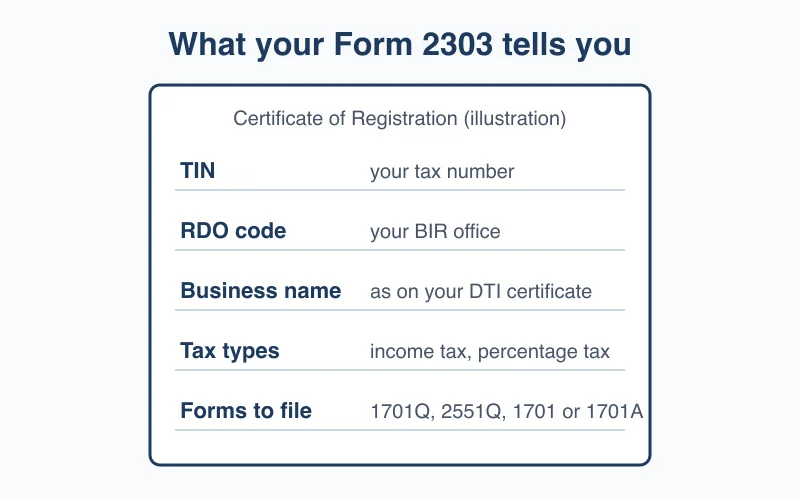
Your RDO then issues your Certificate of Registration (BIR Form 2303). It shows your TIN, RDO, registered tax types and filing obligations. Print it and display it where you do business. Online sellers should also keep a copy ready, because marketplaces and banks ask for it.
Step 7: Register Your Books and Set Up Invoices
You now have two follow-up tasks. Ask your RDO how it wants each one done.
Books of accounts. Keep books of accounts, such as a journal and ledger, as part of your ongoing records (Pinoy Guides). They can be manual notebooks, loose-leaf or computerised. Our understanding is that BIR wants them registered with your RDO before first use, but we could not confirm that, or whether your RDO accepts it through ORUS, in a current source. Ask your RDO.
Invoices. Under the Ease of Paying Taxes Act and Revenue Regulations 7-2024, the invoice replaced the official receipt as the main document for sales of goods and services (PR Station notice, with links to the BIR texts). Before you print invoices, you apply for an Authority to Print using BIR Form 1906 (Pinoy Guides).
Then put three filing dates in your phone calendar:
- Quarterly income tax (Form 1701Q): by 15 May, 15 August and 15 November (Taxify 1701Q calendar).
- Annual income tax (Form 1701 or 1701A): by 15 April of the next year, in place of a fourth quarterly return (same source).
The third date applies only if you chose graduated rates:
- Quarterly percentage tax (Form 2551Q): by the 25th day after each quarter ends. Sellers on the 8% option do not file it (Taxify 2551Q calendar).
When a deadline falls on a weekend or holiday, it moves to the next working day.
Common Mistakes
1. Applying for a Second TIN
Getting a new TIN when you already have one from a past job is against the law and creates two records BIR has to merge. Use your existing TIN and add the business to it.
2. Paying the Old PHP 500 Fee
Some fixers and outdated guides still mention Form 0605 and the PHP 500 annual fee. BIR stopped collecting it on 22 January 2024. If someone asks for it, ask them to show the rule.
3. Missing the 8% Election
Sellers often skip the tax-rate question, then find they are on graduated rates plus 3% percentage tax for the whole year. Decide before you submit.
4. Ignoring the Marketplace Withholding Rule
Under RR 16-2023, online platforms withhold 1 percent of one-half of a seller’s gross remittances before paying them out (Philstar, December 2023). That withheld amount is a credit against the tax you owe, so keep each platform’s withholding certificate.
The same Philstar report quotes the BIR Commissioner saying the withholding does not apply to sellers whose gross income stays at or under PHP 250,000 a year. A platform cannot know that unless you tell it, so check your seller centre for the declaration it asks for and submit it.
5. Registering, Then Never Filing
Registration starts your filing obligations, so file each return on time even in a slow quarter. A late Form 1701Q brings a 25% surcharge, 12% yearly interest and a compromise penalty (Taxify 1701Q calendar).
Frequently Asked Questions
Can I do BIR business registration online?
Yes. The BIR’s Online Registration and Update System (ORUS) at orus.bir.gov.ph lets a sole proprietor file the BIR Form 1901 application, upload supporting documents and receive the Certificate of Registration (Form 2303) without queuing at the Revenue District Office. Your RDO may still contact you for follow-up steps such as books of accounts and invoices, so ask what it needs.
How much does BIR registration cost for an online seller?
Very little. The Ease of Paying Taxes Act (Republic Act 11976) removed the PHP 500 annual registration fee from 22 January 2024. A 2023 guide put the Certificate of Registration charges at about PHP 30 (a PHP 15 documentary stamp tax and a PHP 15 certification fee). We found no source dated after the January 2024 change, so ask your RDO for the current amount.
Do I need DTI registration before registering with BIR?
For a sole proprietorship trading under a business name, yes. BIR’s Form 1901 requirements list the DTI Certificate of Business Name Registration, or a Mayor’s Permit or its application. DTI registration is done online through BNRS, so finish it first and keep the PDF certificate ready to upload to ORUS.
Do Shopee and Lazada sellers need to register with BIR?
Yes. Selling online is a business, so you register like any other sole proprietor, using the same Form 1901 as other self-employed people. BIR also now collects from online sellers directly: under RR 16-2023, platforms withhold 1 percent of one-half of a seller’s gross remittances before payout. Sellers whose gross income stays at or under PHP 250,000 a year are not covered, but must tell each platform through its seller centre.
How long does BIR online registration take?
We have no reliable figure. The form-filling part goes faster when your documents are scanned and ready before you start. Approval depends on your Revenue District Office, and we found no official processing time, so apply well before you need your Form 2303.
You’re a Registered Business
That Form 2303 in your inbox means your store is now a real, registered business in the eyes of the government.
Most people who say “I’ll register someday” never do. You did it from your laptop.
Now get back to the part that grows the business. If your shop isn’t live yet, follow our Shopee seller registration guide or learn how to sell on Lazada Philippines. If it is, your next milestone is your first online sale.